Chat AI Agent

AI Agents That Resolve Customer Chats

Chat AI Agent takes your customers' messages on WhatsApp, and the same AI agents work on your website and your other messaging channels. It answers from your own knowledge, and when a person is needed, it hands over the whole conversation.
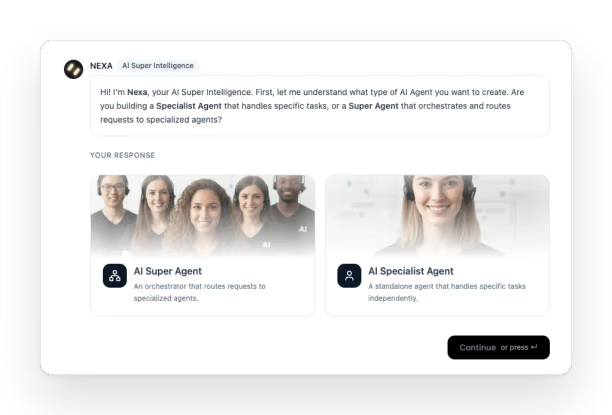
Creating an agent with Nexa: it asks whether you are building a Super Agent that routes requests to specialised agents, or a Specialist Agent that handles specific tasks on its own
Creating an agent with Nexa, a screenshot from the platform.

What goes wrong

Where chat agents fail

A chat agent fails quietly. The customer closes the tab, and nothing in your reports says why.

  • An Answer From Last Month

    The agent quotes a price or a policy you changed weeks ago, because nobody updated the document it reads.

  • Asking for a Person, Again

    Your customer writes that they want to talk to someone and gets the menu back.

  • A Handover That Starts Cold

    The chat reaches your team without the conversation, so the first thing a person asks is something the customer already answered.

  • Nobody Reads the Transcripts

    Most chats are never read by anyone. You find out the agent has been getting something wrong when the same question starts reaching your phone line.

What the platform does

What runs behind the widget

Chat Agent runs on the same platform as Voice AI Agent. Your customer sees the widget; behind it sit the knowledge the agent answers from and the team that takes over when it can't help.

Answers From Your Knowledge

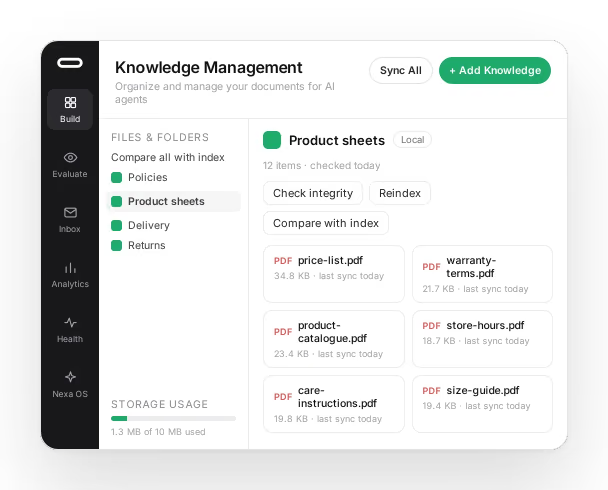
The agent answers from a knowledge base built from your own documents and kept in sync with them. Check integrity and Compare with index show whether the index the agent reads still matches the files in each folder, which catches the price list that was replaced but never reindexed.

We maintain it throughout deployment and then hand it to your team, so the answers stay yours to correct.

Knowledge Management: a folder of product documents the agent answers from, each with its last sync, the Check integrity, Reindex and Compare with index actions, and storage usage
The Knowledge Base, from the platform, shown with sample documents.

Tried Before Anyone Else Sees It

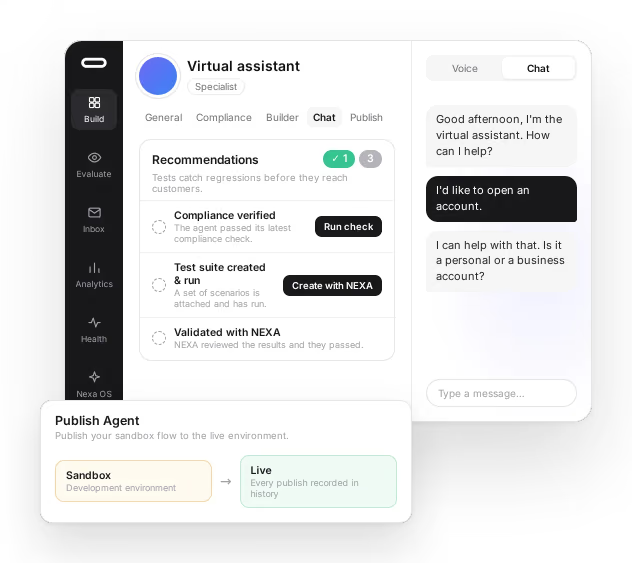
Every agent has its own page, and you talk to it there first, in the Chat tab or by voice. The page also lists what hasn't been checked yet, from the latest compliance check to a test suite Nexa can write for you and Nexa's review of the results.

Publishing moves the flow from the development environment to live, and each publish goes into a history you can read back.

An agent's page: recommendations still open before launch (compliance check, a test suite created with Nexa, validation by Nexa) beside a test conversation in the Chat tab, and a publish panel that moves the flow from the development environment to live
An agent's page and Publish, from the platform, shown with sample data.

Your Brand on the Widget

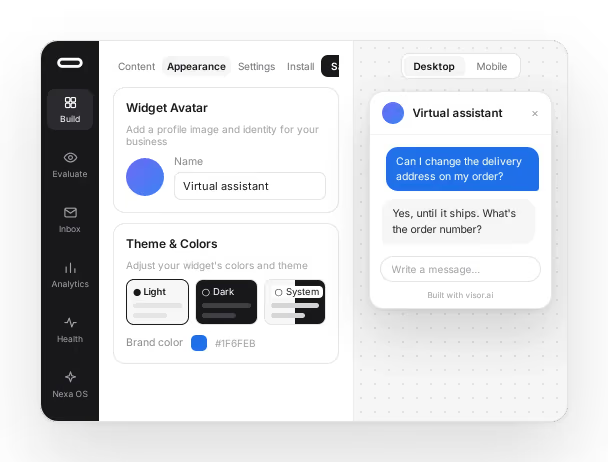
The widget carries your agent's name, its avatar and your brand colour, in a light theme, a dark one or whichever the visitor's system uses. You preview it on desktop and on mobile before it goes live.

The chat widget editor: avatar, name and theme settings on the left, and a live desktop preview of the widget answering a customer on the right
The widget editor, from the platform, shown with sample data.

A Person When It Matters

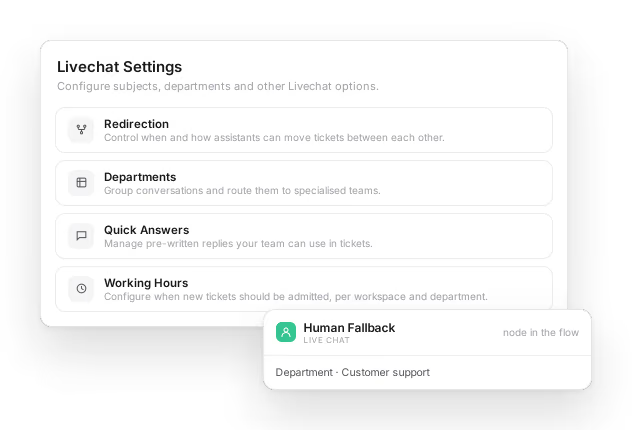
When a chat needs a human, it moves to live chat and is routed to the right department with everything the customer already wrote. Your team works from the quick answers and forms you define, inside the working hours you set, and nobody asks the customer to repeat themselves.

Live chat settings for redirection, departments, quick answers and working hours, with the Human Fallback node from the agent's flow that hands a chat to the team
Live chat and the Agent Builder, from the platform, shown with sample data.

Flagged Before Anyone Complains

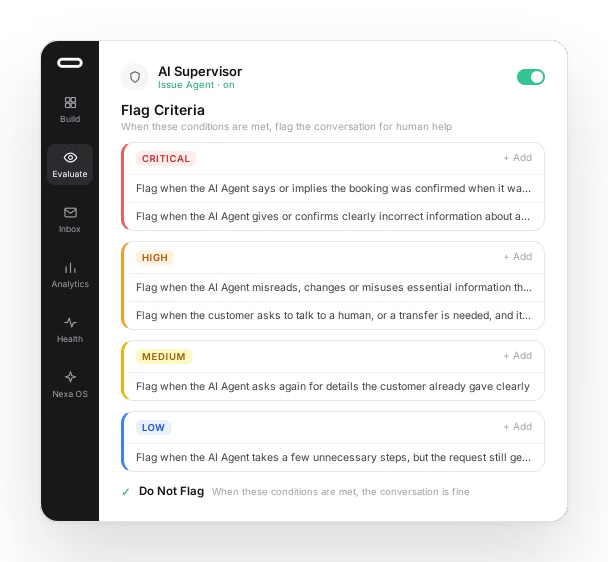
An Issue Agent reads conversations against criteria you write in plain language and sorts what it finds by severity. A wrong booking confirmation can be critical while an extra question is low. You also write what not to flag, which keeps the list short enough to act on.

Watchtower counts the flags across every conversation in progress, and a supervisor can step in from there.

An Issue Agent's flag criteria: plain-language rules grouped as critical, high, medium and low, each describing when a conversation should be flagged for human help
The Issue Agent, from the platform, shown with sample criteria.

Our clients

Companies that work with Visor

How we deploy

  • A dedicated Visor.ai team

    From kickoff to go-live, you work with named people who know your project, whether you come to us directly or through a partner.

  • Clear scope, no surprises

    We agree on what's in and what's out before we start, so everyone knows what success looks like.

  • Built to be measured

    Performance metrics are part of the build, so you see results from your first day in production.

  • Tested with your team

    We test end to end, then your team validates it in real conditions before launch.

  • Your team, in control

    We train your people to run the platform confidently, and we stay by your side for as long as you need us.

An honest word on reliability

The models generate each answer in the moment and can occasionally fail. Visor's work is to contextualise them, apply controls and tune continuously. The solution runs on specialist providers who, like any provider, do not guarantee total availability. That's why the handover to your team gets as much care as the answers: when the agent can't help, a person can.

Questions buyers often ask

How do I automate customer service on WhatsApp with an AI agent?
Chat AI Agent takes your customers' messages on WhatsApp and answers from a knowledge base built from your own documents and kept in sync with them. When a chat needs a human, it moves to live chat and reaches the right department with everything the customer already wrote. The same AI agents work on your website and your other messaging channels.

Choose what you allow. You can change it again at any time.

No choice saved yet. Cookie Policy